No code web development lets you build a professional website using visual drag-and-drop tools, templates and ready-made components, without writing code. Platforms such as Webflow, Wix, Framer and Squarespace make it fast and affordable to launch a site, and many now use AI to create a first draft. No code suits brochure sites, portfolios, landing pages and small stores, while complex, high-traffic or highly customised projects usually still need developers.
Not long ago, building a website meant hiring developers or learning to code. Today, a founder, marketer or designer can launch a polished, working website in days using a no code website builder.
No code web development has grown from a niche trend into a mainstream way to build websites. This guide explains how it works, the best tools, the benefits and limitations and how to decide whether it’s right for your business.
What Is No Code Web Development?
No code web development is the process of building websites using visual interfaces instead of writing code. You drag and drop elements such as text, images, forms and buttons onto a page, adjust the design visually and publish. The platform writes the code behind the scenes.
Most no code platforms include:
- Visual editors for designing pages without code
- Templates to start from a professional layout
- Built-in hosting and security
- Content management for blogs and collections
- Integrations with forms, payments, email and analytics tools
- AI tools that can generate layouts, text and images from a short brief
Low Code vs No Code: What’s the Difference?
| No code | Low code | |
|---|---|---|
| Who it’s for | Non-technical users, marketers, founders | Developers and technical teams |
| How it works | Fully visual, drag and drop | Visual tools plus custom code where needed |
| Flexibility | Limited to the platform’s features | Much more flexible |
| Speed | Fastest to launch | Fast, with more setup |
| Best for | Brochure sites, landing pages, portfolios | Custom apps, internal tools, complex sites |
Many modern platforms blur the line. Webflow, for example, is visual but allows custom code, and WordPress with Elementor works as no code for users and low code for developers.
Popular No Code Website Builders
- Webflow: powerful visual design with strong SEO controls and a built-in CMS. Best for design-led business websites and marketing teams.
- Wix: easy drag-and-drop editing with an AI site builder. Best for small businesses that want to launch quickly.
- Framer: fast, modern sites with smooth animations. Best for startups, portfolios and landing pages.
- Squarespace: elegant templates and simple editing. Best for creatives, restaurants and service businesses.
- Shopify: the go-to no code option for online stores.
- WordPress with Elementor: visual building on WordPress, with the option to add code later. Best for businesses that want flexibility and a huge plugin ecosystem.
7 Benefits of No Code Web Development
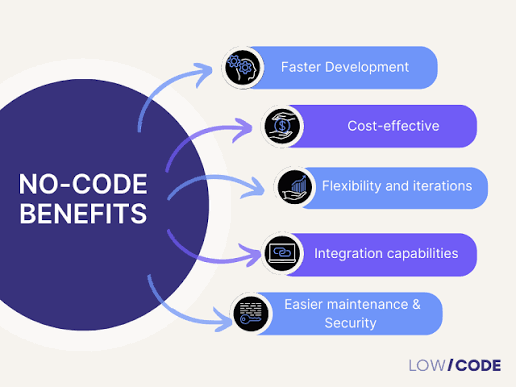
1. Faster launch
A no code site can go live in days rather than months, which is ideal for new businesses, campaigns and product launches.
2. Lower upfront cost
You avoid much of the cost of custom development. Most platforms charge a monthly or annual subscription that includes hosting and security.
3. No technical skills needed
Founders, marketers and designers can build and update the site themselves.
4. Easy updates
Your team can change text, images and pages without waiting for a developer.
5. Quick testing and iteration
You can build prototypes and landing pages quickly, test ideas and improve them based on real results.
6. Built-in hosting and security
Most platforms handle hosting, SSL certificates and updates for you.
7. AI-assisted building
Many builders now use AI to generate a first version of your site, suggest layouts and draft copy, making the first step even faster.
Limitations of No Code Web Development
No code isn’t right for every project. Watch out for:
- Limited customisation: you can only use the features the platform offers.
- Scalability limits: complex, high-traffic or data-heavy sites can outgrow no code tools.
- Platform lock-in: moving your site to another platform later can be difficult, and on some platforms you can’t export a working copy of your site.
- Ongoing subscription costs: fees add up over time, especially as you add features, apps or team members.
- Performance: some builders add extra code that can slow pages down.
- SEO controls: most platforms cover the basics, but advanced technical SEO, such as custom schema or fine control over site structure, can be limited.
Is No Code Good for SEO?
It can be. Platforms such as Webflow and WordPress offer strong SEO control, while others cover the essentials. Before choosing a platform, check that you can:
- Edit page titles, meta descriptions and URLs
- Add alt text to images
- Set up 301 redirects
- Add structured data (schema markup)
- Pass Core Web Vitals on mobile
- Connect Google Search Console and Google Analytics 4
Whatever platform you use, content quality, site structure and speed still matter most.
When to Choose No Code (and When Not To)
No code is a great fit for:
- Startups and small businesses launching their first website
- Brochure websites, portfolios and personal brands
- Landing pages for campaigns and product launches
- Small online stores
- Prototypes and minimum viable products
Consider custom or low code development for:
- Complex websites with custom features, such as booking engines or member portals
- High-traffic sites where performance directly affects revenue
- Deep integrations with CRMs, ERPs or other business systems
- Businesses that need full control over code, data and hosting
Many businesses start with no code and move to a custom build as they grow. If you plan to switch later, choose a platform that lets you export your content and set up redirects.
The Future of No Code Web Development
AI is accelerating the no code movement. Builders can now generate complete first drafts from a short description, suggest copy and images and even automate parts of design and testing. Developers aren’t being replaced. Instead, their work is shifting towards complex features, integrations and performance, while no code tools handle simpler sites.
No code web development is democratising the web, giving more people the power to bring their ideas online.
Frequently Asked Questions
What is no code web development?
No code web development is building websites with visual, drag-and-drop tools instead of writing code. The platform generates the code, while you design pages, add content and publish through a visual editor.
Are no code websites good for SEO?
They can be. Platforms such as Webflow and WordPress offer strong SEO controls, while others cover the basics. Check that you can edit titles, meta descriptions, URLs, alt text, redirects and schema, and that pages load quickly on mobile.
What is the difference between low code and no code?
No code tools are fully visual and designed for non-technical users. Low code tools combine visual building with custom code, giving developers more flexibility for complex projects.
Which is the best no code website builder?
It depends on your needs. Webflow suits design-led business sites, Wix and Squarespace suit small businesses that want simplicity, Framer suits startups and landing pages and Shopify suits online stores.
Can I move a no code website to another platform later?
Sometimes, but it can be difficult. Some platforms let you export content or code, while others don’t. If you expect to switch later, choose a platform that supports exporting and plan your URLs and redirects carefully.
Conclusion
No code web development has changed who can build a website. It’s fast, affordable and empowering, especially for startups, small businesses and marketing teams. But it has limits, and complex or fast-growing businesses often need the flexibility of custom development.
The best choice depends on your goals, budget and plans for growth. Many successful brands use both: no code for speed and custom development for scale.
Build the Right Website With City & Talent
Whether you need a fast no code launch or a fully custom website, City & Talent can help. As a website development company in Mumbai, with teams in Delhi and Dubai, we build fast, SEO-ready websites on the platform that fits your business. If you’re looking for the best digital marketing company in Mumbai to build and grow your website, get in touch with our team.